A clustered metro group, an auto mall, and a group spread across a province do not run their leads the same way. So one inventory-sharing workflow rarely fits all of them.
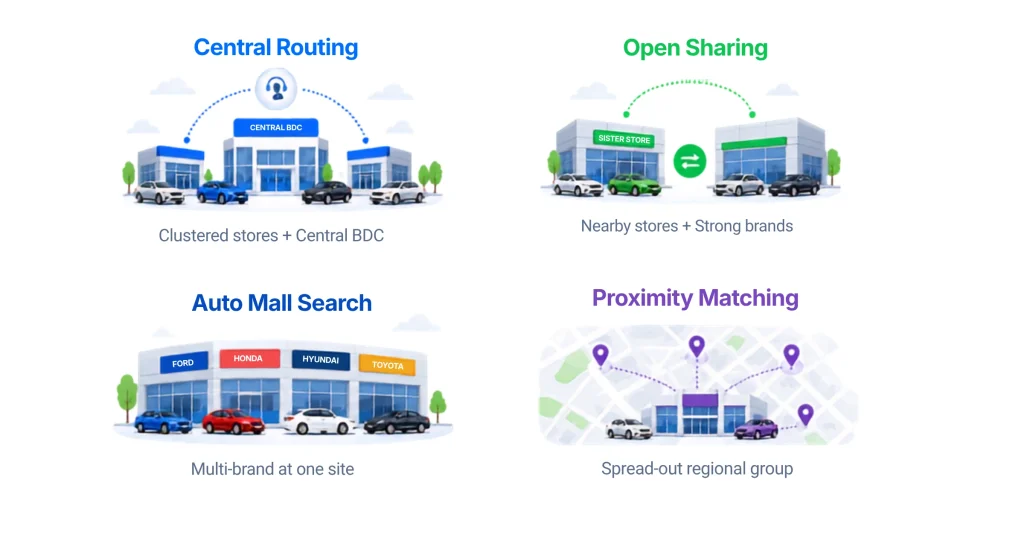
The right setup depends on how your group is built. Clustered stores with a central BDC fit central routing. Nearby rooftops with strong store brands fit open location sharing. Multi-brand auto malls fit cross-brand search. Spread-out groups fit proximity matching. Each one keeps the deal in the group. What changes is what the customer sees and where the lead goes.
One feature, several setups
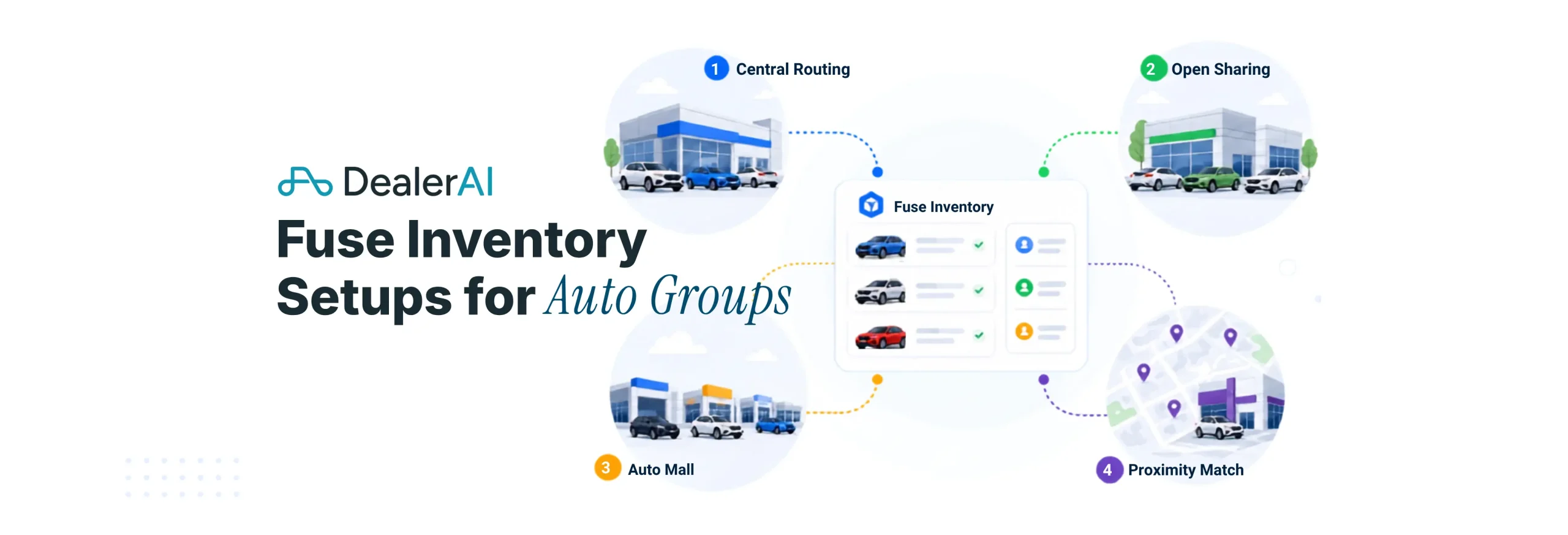
Fuse Inventory is DealerAI’s inventory-sharing tool for auto groups. It matches a buyer to the right vehicle anywhere in your group and gives management one view of stock across every rooftop. How you set it up should follow how your stores are laid out and how your group runs leads. A tight cluster, an auto mall, and a wide regional group should not run the same workflow. Below are four common setups and the kind of group each one fits.
Setup 1: Central routing
Best for: clustered groups with a central BDC and stores close enough to move vehicles easily.
The customer works with the store they found and gets matched to the right vehicle, even when it sits at a sister store. The lead flows to the desk or CRM you choose. This keeps the experience simple and lets one central team handle every inquiry. If the customer asks where the vehicle is, the team shares it and sets the next step.
Setup 2: Open location sharing
Best for: nearby rooftops with strong individual store brands.
When a match turns up, the customer hears that the vehicle is at a named sister store. That gives a clear next step and builds trust, which matters most when the stores sit close together and each carries a brand customers already know. This setup keeps each store’s name front and center while still helping shoppers find the right vehicle across the group.
Setup 3: Auto mall search
Best for: multi-brand groups at one address or auto park.
A shopper compares options across brands in one conversation, say a Camry, an Accord, or a Jetta, without bouncing between separate sites or starting over with another store. Leads follow the mall’s rules, flowing to each store or to a central desk. Since the stores share a location, transport is easy and the customer moves from interest to appointment with little friction.
Setup 4: Proximity matching
Best for: larger groups with stores spread across a market, region, or province.
When the buyer shares a location, the system matches the nearest vehicles that fit the budget and need. The lead then routes to the store with the best match, and the team sets the next step, like a test drive. This fits groups where distance matters to the buyer, and it keeps the customer inside the group while making the closest useful match easy to act on.
Setup comparison
| Setup | Best-fit group | What the customer sees | Where the lead goes |
|---|---|---|---|
| Central routing | Clustered stores with a central BDC | The right vehicle, with location shared when asked | The desk or CRM you choose |
| Open location sharing | Nearby rooftops with strong store brands | The named store that has the vehicle | Usually the store with the vehicle |
| Auto mall search | Multi-brand stores at one site | Options across brands | Per store or central, by your rules |
| Proximity matching | Larger, spread-out groups | The nearest matching vehicles | The store with the closest match |
How to pick
Start with two questions. How close are your stores, and where do you want leads to land. A tight cluster with a central BDC points to central routing. Spread-out stores point to proximity matching. Strong standalone brands point to open location sharing. A shared auto mall points to cross-brand search.
You can mix setups across the group too. A clustered pair might run central routing while a distant rooftop runs proximity matching. Match your inventory, lead flow, and customer experience to how your group actually runs.
FAQ
Can we use more than one setup across our group? Yes. Different rooftops can run different rules, so a clustered pair can use central routing while a distant store uses proximity matching.
Does the customer always get asked for their location? No. Clustered and auto mall setups often skip it, since the stores sit close together. Proximity matching uses location to find the nearest match.
Can we change the setup later? Yes. The rules are configurable, so the setup can change as your group adds stores or shifts how it handles leads.
Which setup keeps the most deals in the group? All four are built to keep more matches inside the group. The best one fits your store layout, how you move inventory, and how you route leads.
Does this replace our CRM? No. Fuse Inventory works with your existing lead flow. The matched vehicle and lead route by the CRM and store rules your group already uses.